Inspect network requests in the iOS Simulator, without a proxy
Last updated:
The iOS Simulator has no built-in list of the requests your app makes. You have two ways to get one. A proxy app on your Mac, such as Proxyman, Charles or mitmproxy, sits between the simulator and the network, and needs its certificate installed and trusted on each simulator before it can read HTTPS. The other way is a tool that reads requests from inside your app.
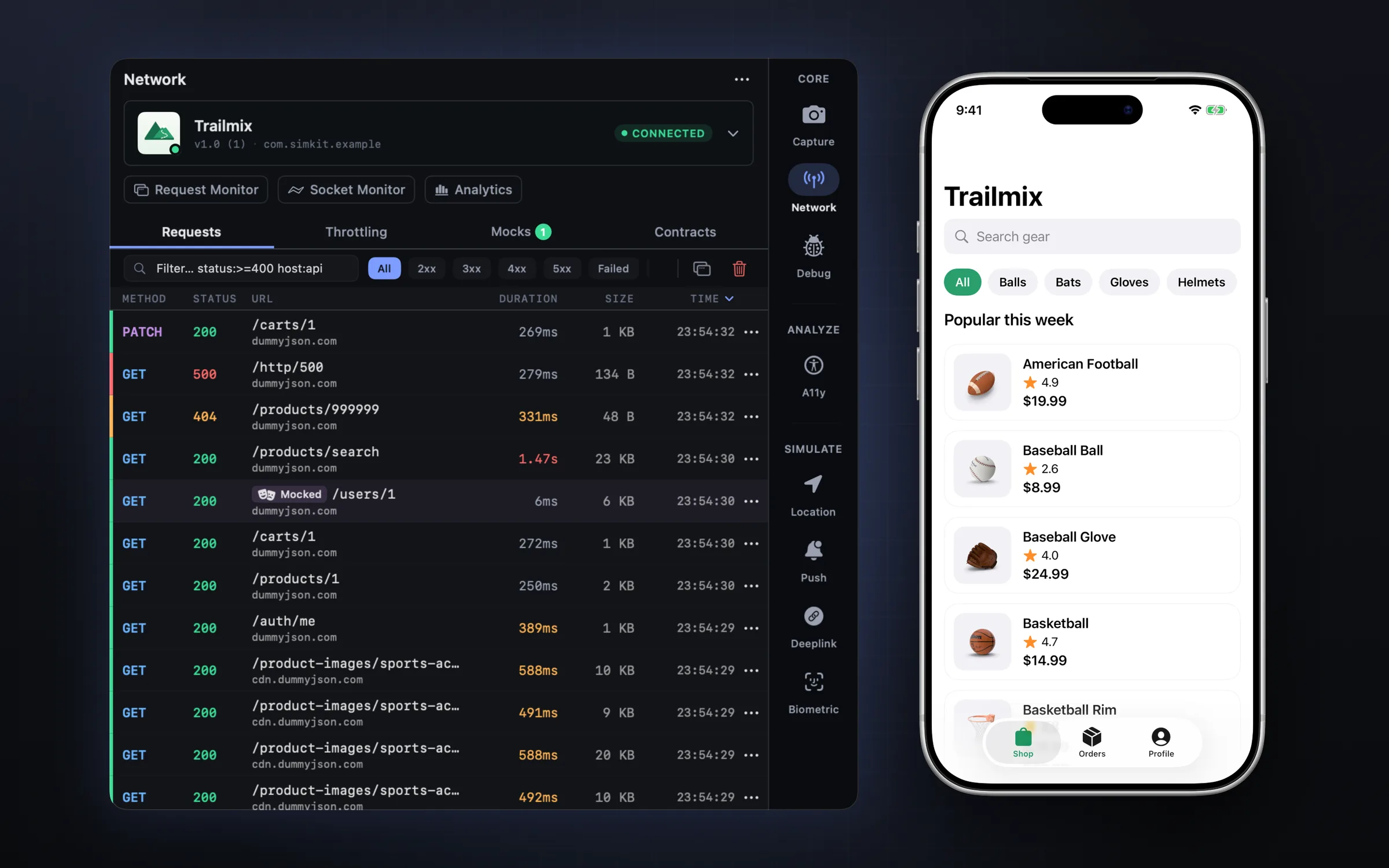
SimKit is the second kind. Add one line to a debug build and every request shows up in a panel beside the simulator, HTTPS included. It is free and runs on macOS 14 or later.
Free · macOS 14 or later · DMG signed and notarized by Apple
Ways to see your app's requests
Both approaches work. They differ in what you set up and in whose traffic you get to see.
| Approach | What you set up | What it shows | Keep in mind |
|---|---|---|---|
| Proxy appProxyman, Charles, mitmproxy | The proxy on your Mac, and its certificate installed and trusted on each simulator. No code change. | Traffic from any app that goes through the proxy. | Certificate pinning can block it. |
| In-app reportingSimKit | The SDK in your debug build, or the DMG build of SimKit to load it for you. No proxy and no certificate. | Your app's requests, HTTPS included. | It sees only your app. |
A proxy is the better choice when you need traffic from an app you cannot rebuild, or traffic that does not come from an app at all. For the app you are building, reading requests from inside it skips the certificate work.
Set up SimKit in three steps
-
Install SimKit
Get it from the Mac App Store or download the DMG. It needs macOS 14 or later. There is no account to create.
-
Add the SDK
In Xcode, choose File > Add Package Dependencies and enter
github.com/ealtaca/SimKitSDK-Binary. The SimKit SDK is a Swift package for iOS 13 or later. Then enable it when your app starts:import SimKit #if DEBUG SimKitSDK.shared.enable() #endifThe SDK talks to SimKit on your Mac over the local network, so it needs one Info.plist key,
NSAllowsLocalNetworking:<key>NSAppTransportSecurity</key> <dict> <key>NSAllowsLocalNetworking</key> <true/> </dict> -
Run your app
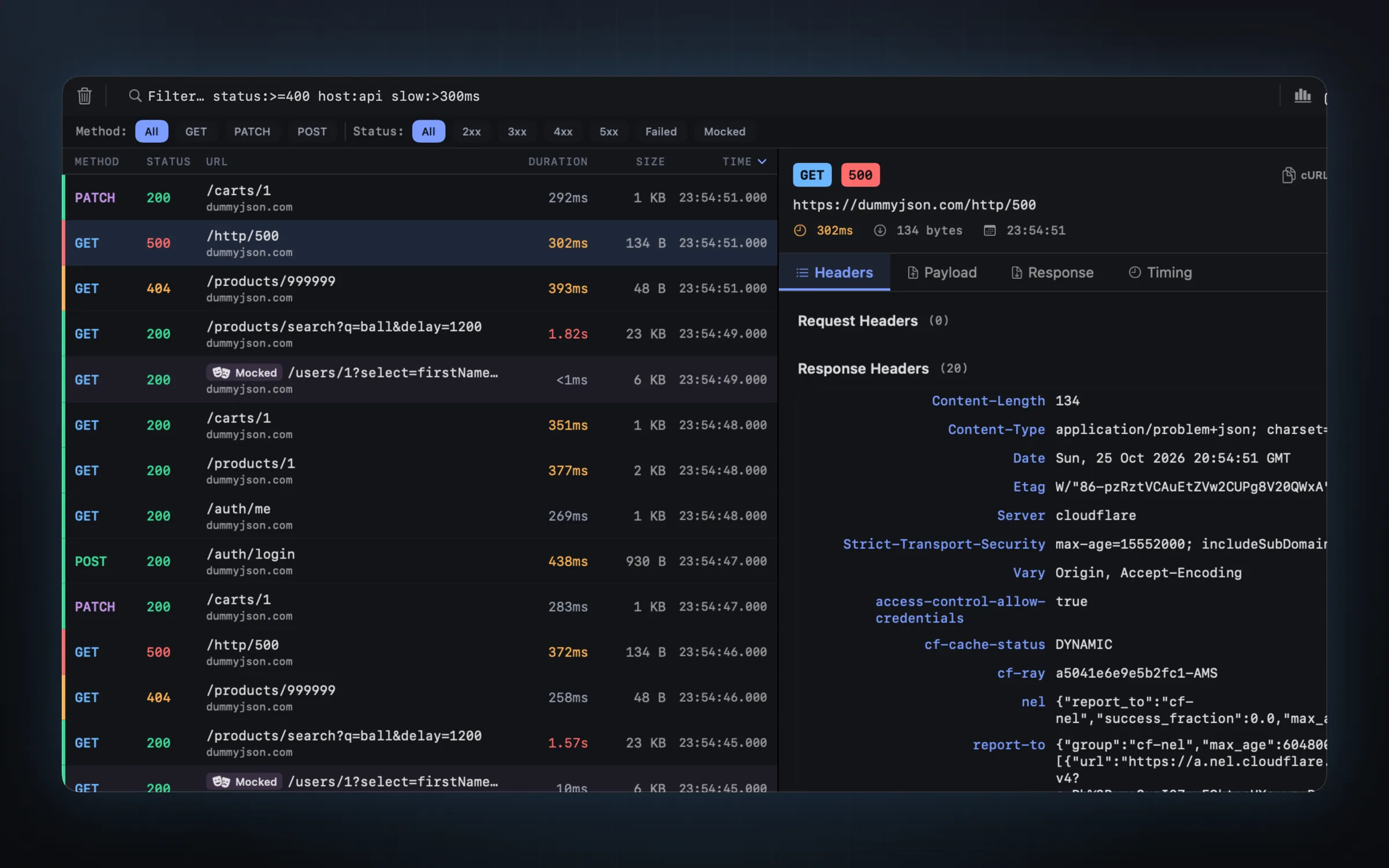
Build and run in the simulator as usual. Requests show up live in the panel beside the simulator, each with its status, timing and size.
No SDK yet? Let the DMG build load it
The DMG build of SimKit can start a simulator app with the SDK loaded into it. Requests show up and mocks apply, and your code does not change. This is in the DMG build only, and it works on the simulator only. The App Store build needs the SDK added to your project.
Find the request that matters
A busy app makes a lot of calls. Type a query and the list narrows to the failures, the slow ones or a single host.
- Query filter. For example
status:>=400 host:api slow:>300mskeeps failed or slow calls to one host. - Status, timing and size for every call, as it happens.
- What it sees. URLSession requests, including Alamofire and Moya, WebSocket connections and WKWebView page loads.
- Request origin. The code a request came from, so you know which screen or service fired it.
- JSON tree. Filter a body by path, like
$.users[*].email, and copy the path, key or value.
What you can do with a request
- Edit and resend. Change a request, send it again and compare the two responses.
- Copy it as cURL, fetch, HTTPie or Swift, or export the session as HAR.
- Generate a model. Swift Codable types from any JSON response.
- Save a contract. Keep the shape of a response and get warned when the endpoint returns something else.
A captured request is also the starting point for a mock. The guide to mock API responses covers that. To watch the same calls on a bad connection, see how to simulate a slow network.
Patterns SimKit points out
Some problems only show across many requests. Insights flags refresh storms, retried POSTs, duplicate GETs and re-downloads of unchanged data. Analytics draws a latency histogram and p50/p95 over time, with the change since the previous window, so you can tell whether a change made the app's calls faster or slower.
Tokens and auth
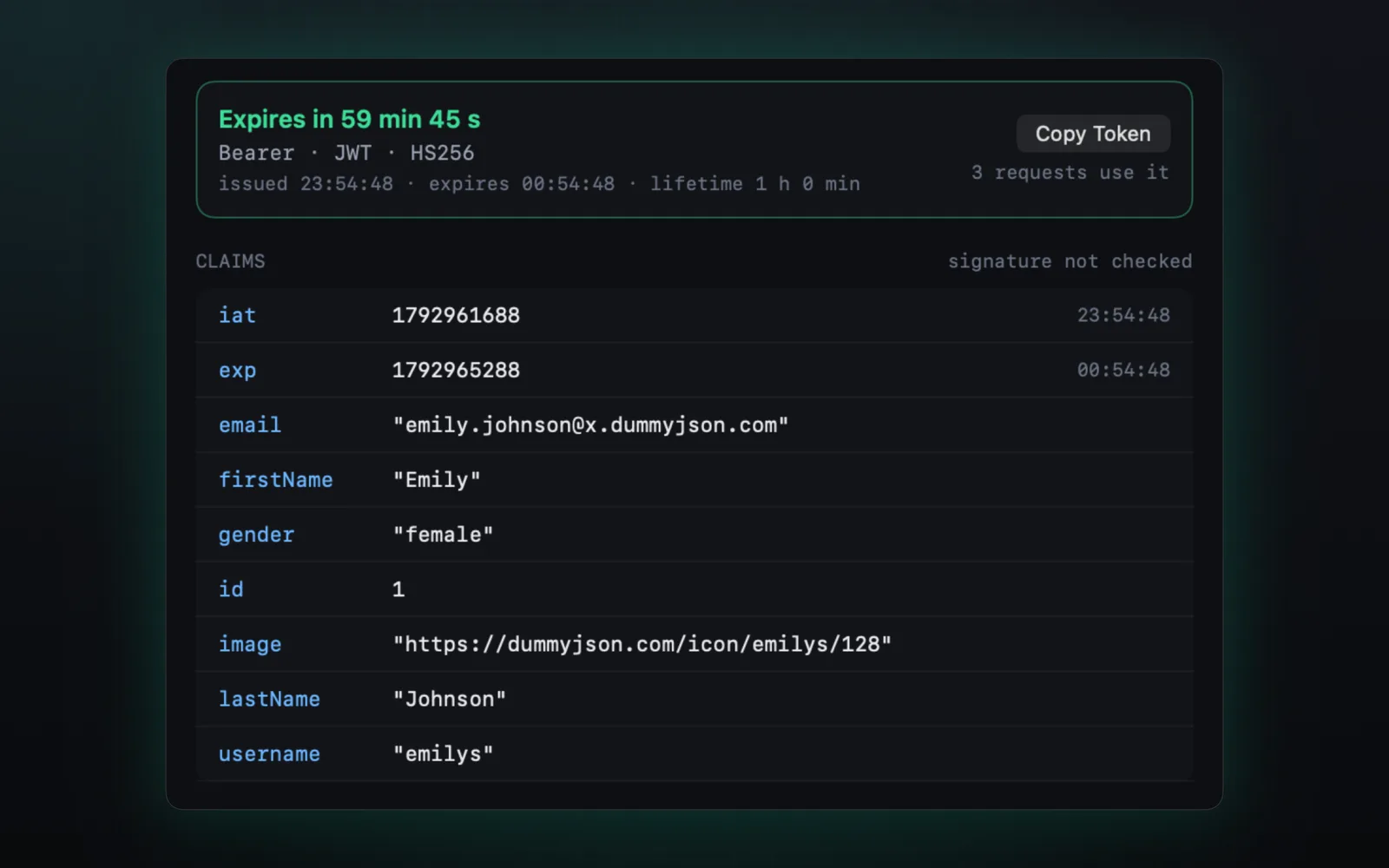
SimKit decodes every JWT your app sends and shows its claims, its history and a live countdown to expiry. Press Expire Token and watch whether your refresh logic holds. There is more on this in testing an expired token.
Real iPhones and iPads
The same list works off the simulator. An iPhone or iPad running your app with the SDK pairs with your Mac by a 6-digit code and sends its traffic over Wi-Fi, encrypted. Mocks reach the device too.
Let your coding agent read the same requests
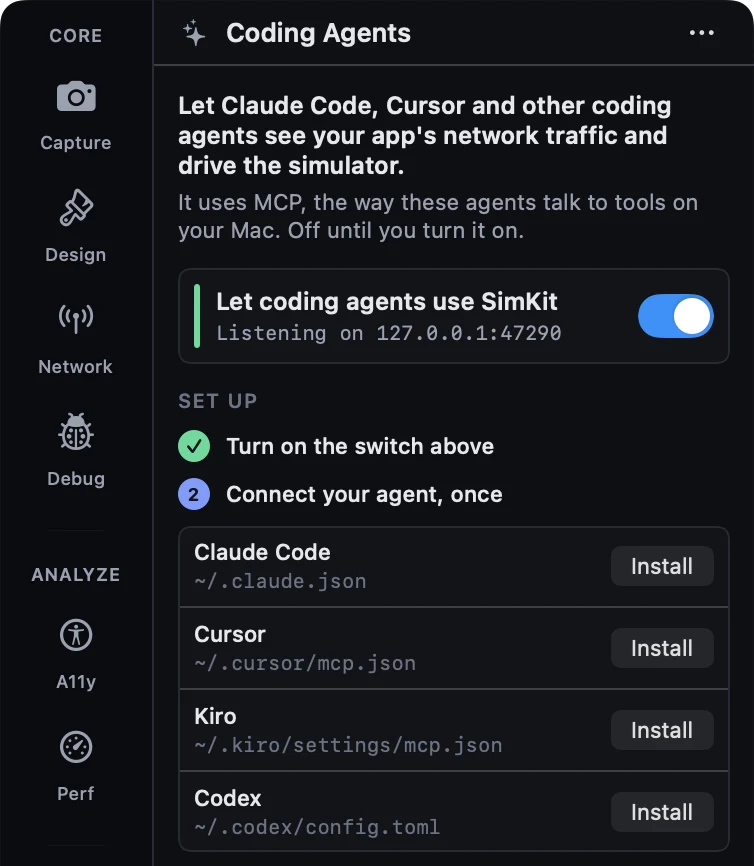
SimKit includes an MCP server, so Claude Code, Cursor, Codex and other MCP clients can list the requests your app made and tell you which ones failed. Turn on Coding Agents in SimKit's Agents tab, then add it to your agent. The MCP server is in the DMG build; the Mac App Store build doesn't have it yet. For Claude Code:
claude mcp add simkit -- npx -y simkit-mcpThe SimKit MCP server page has the setup for other clients.
Limits
- Network monitoring needs the SDK in your build, or the DMG build of SimKit to load it on a simulator.
- It shows your app's traffic, not traffic from other apps. Use a proxy for those.
- Enable the SDK inside
#if DEBUG, so nothing runs in your release builds. - On a real device you get traffic and mocks. The tools that drive the simulator itself stay on the simulator.
FAQ
Do I need a proxy or a certificate to see HTTPS traffic in the iOS Simulator?
No. The SimKit SDK reports requests from inside your app, after the system has decrypted them, so there is nothing to install on the simulator and nothing to trust.
Do I have to change my code?
One line of Swift in a debug build. On a simulator, the DMG build of SimKit can also load the SDK into your app for you, and then your code doesn't change.
Does it work on a real device?
Yes. An iPhone or iPad running your app with the SDK pairs with your Mac by a 6-digit code and sends its traffic over Wi-Fi, encrypted.
Which network libraries does it see?
Requests made with URLSession, including libraries built on it such as Alamofire and Moya, WebSocket connections and WKWebView page loads.
Does it show WebSocket traffic?
Yes. Socket frames and web view page loads appear next to your HTTP calls.
Do my requests leave my Mac?
Captured requests, headers, bodies and tokens stay on your Mac. If you connect a coding agent, what it reads goes to its own model provider, as with any file it reads. SimKit sends anonymous usage data, including the bundle IDs of apps you debug, to Firebase, and you can turn it off in Settings. See the Privacy Policy for details.
Is it free?
Yes. SimKit is free, with no account.
See what your app sends.
Free on the Mac App Store, or as a DMG straight from here.