How to mock API responses in an iOS app
Last updated:
Pick the method by where the mock should live. In test code, use a URLProtocol stub. For a whole fake backend, run a local mock server and point the app at it. To change what a running app receives without touching its code, use a proxy rule or SimKit.
| Method | Code change | Works on a running build | Good for |
|---|---|---|---|
| URLProtocol stub | Yes, in your test setup | No, it is compiled in | Unit and UI tests that must give the same result in CI |
| Local mock server | A base URL switch | Yes, if the build points at it | Building against an API that does not exist yet |
| Proxy rule | None | Yes | Apps you cannot rebuild, once the proxy's certificate is trusted |
| SimKit mock | One SDK line in a debug build, or none with the DMG build on a simulator | Yes | Changing one response in the app you are running now |
1. URLProtocol stubs, for unit and UI tests
URLProtocol is the Foundation class that carries out a URL load. A subclass of your own can claim a request before it reaches the network and answer it with whatever the test needs. Register the subclass on the URLSessionConfiguration your networking code uses, and no request leaves the process.
import Foundation

final class StubURLProtocol: URLProtocol {
    // Set by each test before it makes a request.
    static var handler: ((URLRequest) throws -> (HTTPURLResponse, Data))?

    override class func canInit(with request: URLRequest) -> Bool {
        true
    }

    override class func canonicalRequest(for request: URLRequest) -> URLRequest {
        request
    }

    override func startLoading() {
        guard let handler = Self.handler else {
            client?.urlProtocol(self, didFailWithError: URLError(.resourceUnavailable))
            return
        }
        do {
            let (response, data) = try handler(request)
            client?.urlProtocol(self, didReceive: response, cacheStoragePolicy: .notAllowed)
            client?.urlProtocol(self, didLoad: data)
            client?.urlProtocolDidFinishLoading(self)
        } catch {
            client?.urlProtocol(self, didFailWithError: error)
        }
    }

    override func stopLoading() {}
}

// In a test: build the session your networking code will use.
let configuration = URLSessionConfiguration.ephemeral
configuration.protocolClasses = [StubURLProtocol.self]
let session = URLSession(configuration: configuration)

StubURLProtocol.handler = { request in
    let response = HTTPURLResponse(url: request.url!, statusCode: 500,
                                   httpVersion: nil, headerFields: nil)!
    return (response, Data(#"{"error":"server"}"#.utf8))
}
Set the handler at the start of each test, then run the code under test with that session. The answer is the same on every run and needs no server. In a UI test the stub has to be compiled into the app itself and switched on by something like a launch argument, because the test runner is a separate process.
Use it for automated tests. This is the best option for unit and UI tests in CI, and SimKit does not replace it.
2. A local mock server
Run a small HTTP server on your Mac that returns canned responses, and point the base URL of your debug build at it. Mockoon is one example with a GUI. The simulator shares your Mac's network, so localhost reaches the server. Plain HTTP may need an App Transport Security exception such as NSAllowsLocalNetworking.
Use it to build against an API that does not exist yet. The whole app runs against the fake backend. The cost is a configuration switch in the app and a second thing to keep running and up to date.
3. A proxy rule
A debugging proxy sits between the app and the server and can answer a matching request itself. Proxyman and Charles both call this Map Local: the request gets a file from your Mac as its response, and the app is not changed. To read HTTPS, the proxy needs its certificate installed and trusted on the simulator, and an app that pins certificates can refuse it.
Use it when you cannot rebuild the app, or when a proxy is already part of how you work.
4. SimKit mocks, for the app you are running right now
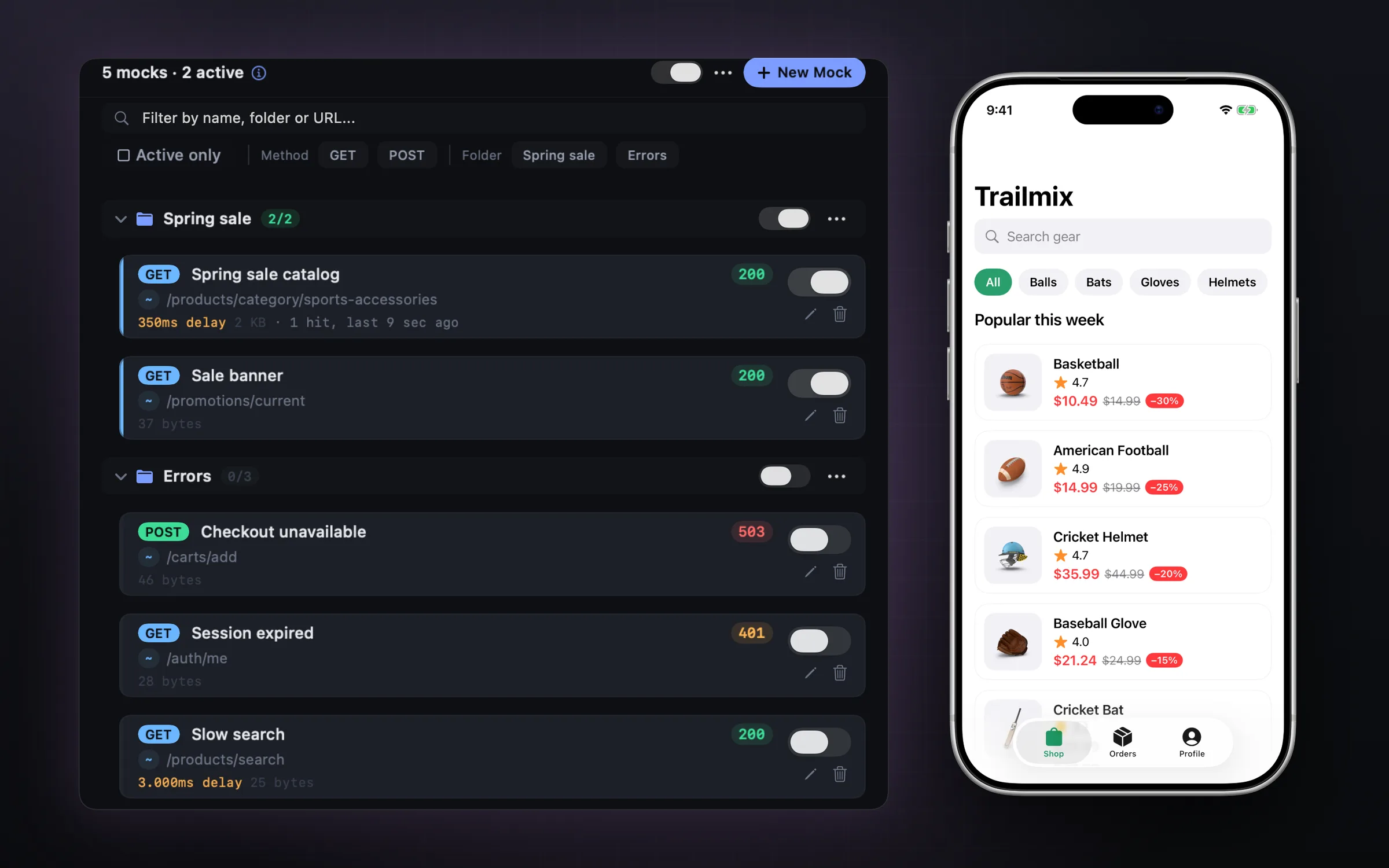
SimKit is a free Mac app that sits beside the iOS Simulator. It reads traffic from inside your app, so there is no proxy to configure and no certificate to trust. A mock starts from a request you just captured, and you change only what you need.
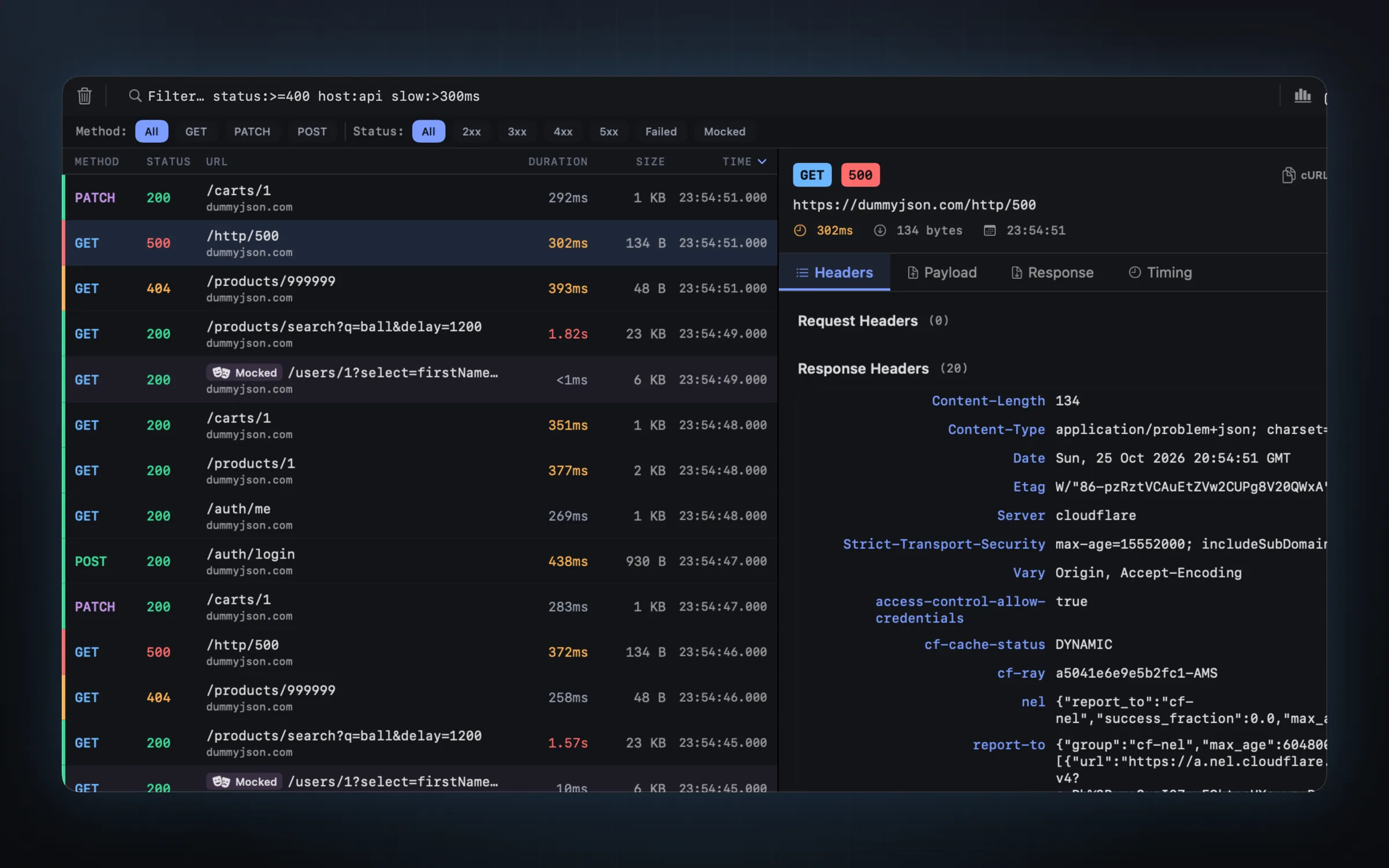
-
Capture the request
Run your app with the SimKit SDK in a debug build and open the screen you want to test. Its requests appear in SimKit's list. The iOS Simulator network inspector page has the setup.
-
Turn it into a mock
Start a mock from that request and edit the status code, the headers, the body or the delay. Return a 503 from the checkout call, an empty list of products, or the real body after a delay.
-
Check what it catches
Would Match shows which requests a rule catches before you switch it on, so you know its reach before the app feels it.
-
Confirm it fired
Every mock keeps a hit count. If the screen did not change, the count tells you whether the mock answered a request at all.
SimKit is free, with no account. macOS 14 or later.
Save scenarios and share them
Mocks are more useful when the whole team has the same ones. SimKit saves scenarios as .simkitscenario files that you can share. Keep one for a sale and one for errors, like the two groups in the screenshot above, and a teammate can check the same states you did.
Test an expired token
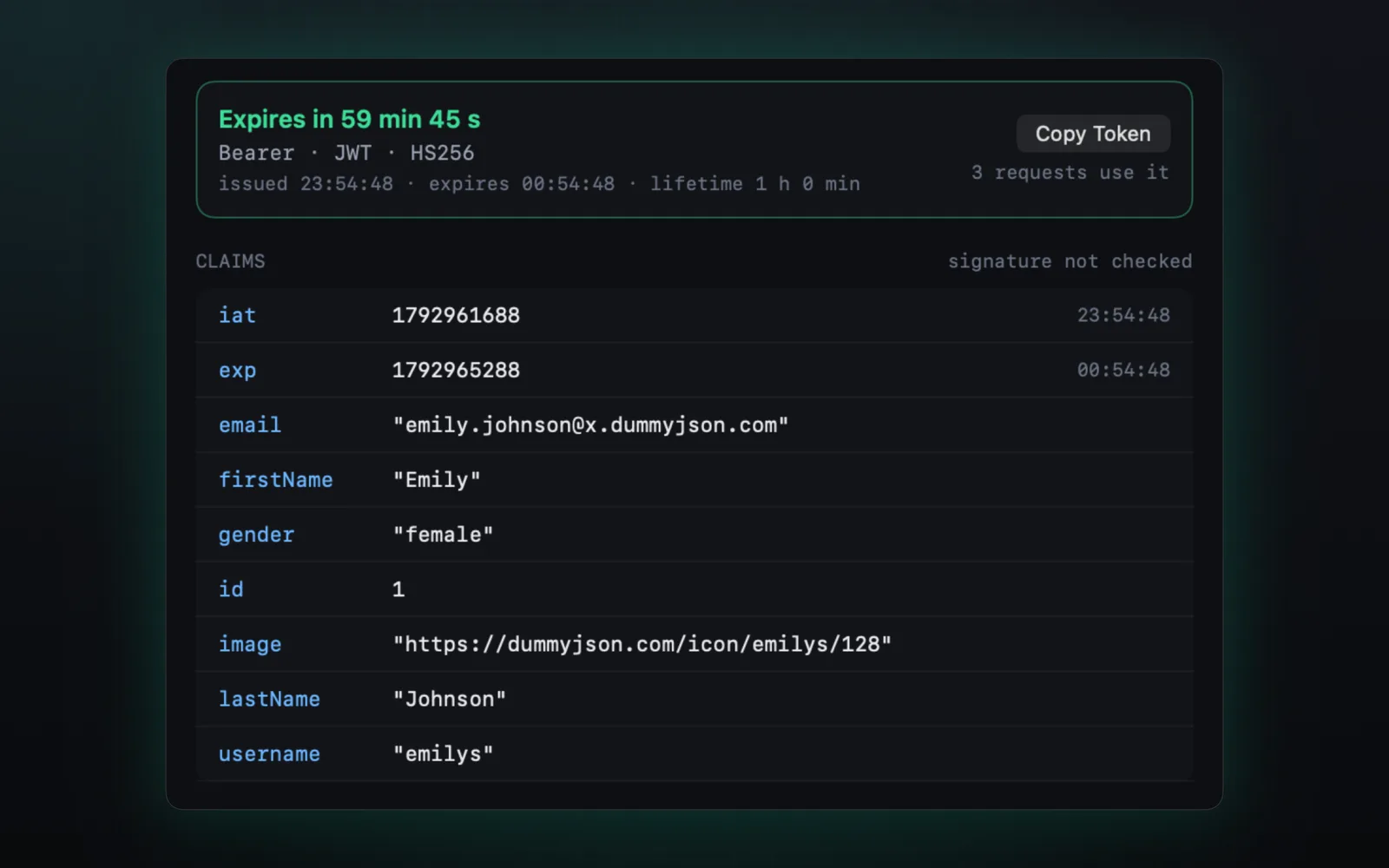
An expired token is not a mock in the strict sense, but the goal is the same: a state the backend will not give you on demand. SimKit's Auth tab shows every JWT your app sends, decoded, with its claims, its history and a live countdown. Press Expire Token and watch whether your refresh logic holds.
Let a coding agent set the mock
SimKit has an MCP server, so Claude Code, Cursor or Codex can run the same check for you. Asked for a failing login, an agent can call set_mock, relaunch_app, wait_for_request, screenshot and remove_mock in turn. The MCP server is in the DMG build; the Mac App Store build doesn't have it yet.
Mock /login to return a 500, relaunch the app and show me what the user sees.
- set_mockPOST /login answers 500
- relaunch_appcom.example.shop restarted
- wait_for_requestPOST /login finished, 500 from the mock
- screenshotthe login screen, as the simulator shows it
- remove_mockback to the real server
An illustration of a session. The tool names are SimKit's own.
The SimKit MCP server guide has the setup for each agent.
Requirements and limits
- The SDK, or the DMG build. Mocks need the SimKit SDK in a debug build: one line of Swift, enabled inside
#if DEBUG. On a simulator, the DMG build of SimKit can start your app with the SDK loaded into it, and your code does not change. - Real devices too. Mocks also reach an iPhone or iPad paired with your Mac.
- Not for CI. SimKit mocks are for a running app on your desk. Automated tests should keep their
URLProtocolstubs. - One endpoint, not the connection. A delay slows the response you mocked. For a slow connection as a whole, see slow network testing.
- Versions. SimKit needs macOS 14 or later. The SDK supports iOS 13 or later.
Questions, answered.
Can I mock without changing my app's code?
With the DMG build of SimKit on a simulator, yes: it can start your app with the SDK loaded into it. Otherwise it is one line of Swift in a debug build. A proxy rule also needs no code change, but it needs the proxy's certificate trusted on the simulator.
Should I use SimKit mocks in unit tests?
No. Use URLProtocol stubs there, so the tests run the same way on every machine and in CI. SimKit is for manual checks and agent-driven checks on a running app.
Can I return an error status or a slow response?
Yes. A SimKit mock sets the status code, the headers, the body and a delay.
Do mocks work on a real iPhone?
Yes. Mocks reach an iPhone or iPad that runs your app with the SDK and is paired with your Mac by a 6-digit code.
How do I share mocks with my team?
Save them as a scenario. A scenario is a .simkitscenario file you can send to a teammate.
Is it free?
Yes. SimKit is free, with no account.
Mock the next response in the app you already have running.
Free on the Mac App Store, or as a DMG.
Free · macOS 14 or later · DMG signed and notarized by Apple